IAM.Hosting
Serverless runtime and lifecycle management for hosted agents in Kubernetes.
Key capabilities
- Scale-to-zero agent workloads
- Execution isolation and scoped credentials
- Wake, reap, quota and runtime-health lifecycle
Step-by-step guides
Use cases
Start with the outcome: open a guide, prepare prerequisites, follow the steps and verify the success signals.
01 Find and wake a serverless agentA sleeping deployment moves to waking/running and the operator sees latency and replica state.
- Audience
- Platform operator
- Outcome
- A sleeping deployment moves to waking/running and the operator sees latency and replica state.
Before you start
- Operator-console access
- Deployment id
- Available capacity
Steps
- Verify the environmentSelect staging or production in the header and verify the namespace before every action.
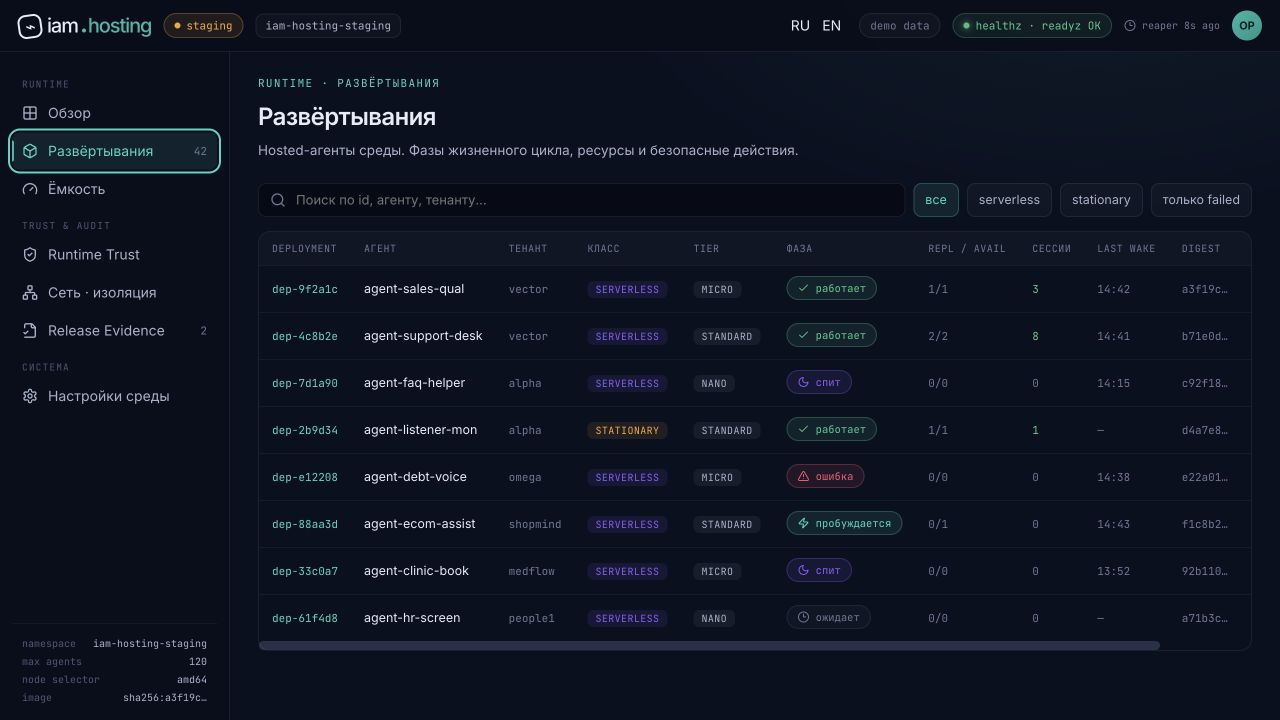
- Open DeploymentsFind the deployment by id, agent or tenant and confirm it is serverless.
- Click WakeThe command submits a wake request; do not click repeatedly.
- Verify the phaseWait for waking → running and check repl/avail, session count and recent wake.
Step screenshots


Video guide
The frames follow the sequence above; every screenshot caption names the state to verify.
Media provenance: Captured on 6 August 2026 in the operator console's built-in demo mode; no Kubernetes state was changed.
Phase is running, available replicas are above zero and wake latency meets SLO.
On timeout, check Capacity, Events, image trust and node selector before retrying Wake.
02 Diagnose a hosted-agent startup failureThe failure is classified before retry and is not hidden by endless retries.
- Audience
- SRE or operator
- Outcome
- The failure is classified before retry and is not hidden by endless retries.
Before you start
- Deployment id and correlation id
- Events/Logs access
- Expected image digest
Steps
- Record phase and reasonRecord failed state, timestamp, desired class and digest before changing the deployment.
- Check EventsDistinguish capacity, image pull, policy, crash and readiness failures.
- Check Trust and NetworkVerify image signature, runtime policy, egress allowlist and credential refs.
- Fix the cause and retry onceAfter the fix, run Wake and compare the new correlation id with the original.
Deployment is running, readiness is green and the original incident links to remediation.
Do not undeploy before saving evidence or root-cause context will be lost.
Open detailed manual
Every application screen has a separate page with controls, safe example values, CLI/API alternatives and status-specific recovery steps.
Role in the ecosystem
IAM.Hosting turns the published AgentPackage into a managed runtime session
based on the Rust engine iam-agent and Kubernetes. The service is responsible for launching
isolation, health, quotas, stopping idle workloads and sending the result back
in Marketplace.
Execution life cycle
install → wake → hydrate scoped config → execute → persist result → reap
A user request wakes up a workload or creates a new instance. Runtime gets the required version of the package and links to allowed credentials, publishes running state, and after a period of inactivity is scaled to zero.
Isolation and data
- separate identity and resource envelope for launch;
- prohibition of undescribed capabilities and network directions;
- secrets are mounted only during execution;
- logs should not contain credential material;
- user artifacts are saved separately from the ephemeral container.
Observability
The operating minimum includes the run queue, wake latency, execution time, OOM/timeout, number of retries, reaper state and cost per tenant. Correlation id associates the Marketplace action with the pod/runtime event and delivered result.
Limit of responsibility
IAM.Hosting is not a standalone directory or visual builder. The public control surface is located at IAM Marketplace, and capability contracts can be resolved via IAM.Core.
Verified entry points
- Application
- https://iam.market/
- Portfolio
- https://iamgroup.ru/en/